
Unity Ongoing 2DCGAdventureAi CGAnal SexAnimatedBig AssBig TitsCharacter CreationCreampieDating SimFantasyGropingMale DominationMale ProtagonistMasturbationMobile GameMonster GirlMultiple penetrationRomanceSandboxSchool SettingSci-FiTeasingTentaclesTurn Based CombatVaginal SexVoiced AndroidLinuxMacWindows
Screenshots

Genres
Game Description
HoTime Saga:
Hotime Saga is a fully animated,
open-world novel and dating sim where androids handle politics while humans serve as the labor force.
Experience dating/fucking fascinating characters in this futuristic world, including both women and androids.
Inspired by Summertime Saga and other popular games in the genre,
Hotime Saga aims to bring something new for the players.
We hope you enjoy your time!
Princess Sophia:
A fantasy novel where you fight and fuck some Princesses!
Extract and run.
No patch notes available.
- Dual Core Pentium or equivalent Processor.
- Intel HD 2000 or equivalent Graphics.
- 427.93 MB of free disk space (Recommended to have twice as much free disk space).
Hotime Saga - Ongoing - v.0.80 Download Links
Hotime Saga is a porn game made on Unity game engine.
The current available version is v.0.80.
The contents of the game are Uncensored. Hotime Saga is developed by AdultPlay.
Please support the developer if you want continued development.
Download links are gathered from public sources. We do not host or modify contents.
Walkthrough and Guide
Crack: FILEKNOT
Crack Installation:
Crack Features:
How do I run it on Mac/Linux:
I provide convenient installation only for windows x64 bit, but since most of my patches are BepInEx plugins nowadays, you can install it on other OS:
Supported Operating Systems
How to Install
Cheat Table: FILEKNOT
How do I get a copy of Cheat Engine:
There are several ways to download the tool:
NB: Cheat Engine is available on Windows and MacOS only.
NB: Make sure you have the LATEST or at least a penultimate version of CE when using others' cheat tables to avoid incompatibility issues
How does Cheat Engine work:
It's basically a debugging tool on steroids. There's a lot to unpack on how it works, but my scripts rely on AOB signatures (be they hardcoded ASM cheats, pointers with offsets, etc) and LUA scripting. The challenge is to create consistent and resilient cheats working between versions, but there's nothing permanent with compilers and optimizations.
AOB signatures work like this: a byte signature is scanned to find the first match in the .text (code) section, then CE gracefully injects a detour jump to the allocated cheat script (or in a code cave) that tweaks the game behavior and then returns to the next instruction after the injection. Sometimes AOB-based cheat scripts modify a function's behavior in-place.
Lua scripts that are running in the CE's lua engine are basically meta-scripts to extend CE's functionality with a neat API.
Where do I put a cheat table / .CT file:
Wherever you deem suitable, usually tables are standalone .CT files and making dependencies for them isn't a good practice. When you run a cheat table, it's loaded into and interpreted by Cheat Engine.
How to use Cheat Engine:
First of all, make sure your Cheat Engine instance is running with administrator rights to make sure it is able to read, write to memory properly. To do that, you can grant administrator rights by clicking RMB on Cheat Engine shortcut (to open its context menu), then go to Properties -> Compatibility (tab) and tick 'Run this program as an administrator'. Likewise, you can go to CE settings (when in the CE GUI, Edit->Settings) you can also find 'Always attempt to launch as admin' option. Or if you need it once, just run CE as an administrator (RMB on the CE shortcut, 'Run as an administrator'
For cases when tables DON'T have an attach script in them:
When Cheat Engine is opened and/if a cheat table for a specific game is loaded into it, the first thing that's needed is to attach to the specific game executable.
Attach button is highlighted:
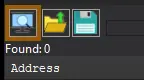
After pressing this button, you will see active processes with their PIDs exposed by Windows. If you struggle to find yours, check other tabs, there are 3 of them: Application, Processes, Windows.
For cases when tables DO have an attach script in them:
You'll see a script like *this*, just activate the checkbox. Does it fail to attach? Please read 'Why does the attach script fails when I activate it?' below
Attach script:

Once you are attached, activate other scripts that you need and have fun. Usually scripts are quite simple to use, but if there are instructions, just follow them to make it work. Sometimes certain actions are required for scripts to work properly, .e.g pressing a button to catch a pointer, loading into the game/level world to ensure a character actor is constructed, etc.
Sometimes scripts will fail to be executed. Usually the error will be written in the context menu of a script that's failed (just click RMB on the failed script, the first row will be the error message). Some scripts may print errors/tracebacks into the CE Lua Engine output window: either way, when you report an error, provide the reason WHY it fails.
Error Example: AOB not found:

If a script activates, but the intended behavior is not achieved (you'd be lucky if it doesn't crash though), most probably there was a game update that touched offsets (provided the table was based on any, which is probably the case) - a new field added, hence game compiled differently, a different game engine version used, or whatever that caused the shift. That means the table has to be updated - it's obvious if the game was updated recently, but the table was posted long before.
ALSO: go to 'OK, I'm attached to the game correctly, but next scripts fail to run OR crash the game. What's wrong?'
Crack Installation:
- Unpack into game folder (where .exe file is located)
- Run the game. First run will be slow, please wait
Crack Features:
- Bypasses patreon login screen, turning free version into patreon version
- Should work with upcoming versions
How do I run it on Mac/Linux:
I provide convenient installation only for windows x64 bit, but since most of my patches are BepInEx plugins nowadays, you can install it on other OS:
Supported Operating Systems
- Windows 7, 8, 8.1, and 10 (both x86 and x64 are supported)
- Linux distros with GCC 10 or newer, preferably GNU/Linux distro (x86_64 and x86 archs are supported)
- macOS 10.13 High Sierra or newer
How to Install
- Determine your OS and Game's scripting backend (il2cpp / mono)
- if the patch is attached to F95 attachments -> It's mono
- if the patch is uploaded to GOFILE -> it's il2cpp
- Download BepInEx for your OS and Scripting backend
- Unpack downloaded BepInEx contents into game folder
- Windows: where .exe file is located
- Linux: where the executable
<Game>.x86or<Game>.x86_64is located - Mac: where the game
<Game>.appis located
- Run the game once so BepInEx creates necessary files and folders
- Open
BepInEx/pluginsfolder and copy contents of the same folder from the patch, provided in this post, there - Done!
Cheat Table: FILEKNOT
How do I get a copy of Cheat Engine:
There are several ways to download the tool:
- Official Cheat Engine website - a free, compiled executable. While installing, make sure you decline all adware
- Dark Byte's Patreon - $2.5/mo membership to get the latest releases and hotfixes already compiled
- Cheat Engine Github - if you want to compile it or CE github releases
NB: Cheat Engine is available on Windows and MacOS only.
NB: Make sure you have the LATEST or at least a penultimate version of CE when using others' cheat tables to avoid incompatibility issues
How does Cheat Engine work:
It's basically a debugging tool on steroids. There's a lot to unpack on how it works, but my scripts rely on AOB signatures (be they hardcoded ASM cheats, pointers with offsets, etc) and LUA scripting. The challenge is to create consistent and resilient cheats working between versions, but there's nothing permanent with compilers and optimizations.
AOB signatures work like this: a byte signature is scanned to find the first match in the .text (code) section, then CE gracefully injects a detour jump to the allocated cheat script (or in a code cave) that tweaks the game behavior and then returns to the next instruction after the injection. Sometimes AOB-based cheat scripts modify a function's behavior in-place.
Lua scripts that are running in the CE's lua engine are basically meta-scripts to extend CE's functionality with a neat API.
Where do I put a cheat table / .CT file:
Wherever you deem suitable, usually tables are standalone .CT files and making dependencies for them isn't a good practice. When you run a cheat table, it's loaded into and interpreted by Cheat Engine.
How to use Cheat Engine:
First of all, make sure your Cheat Engine instance is running with administrator rights to make sure it is able to read, write to memory properly. To do that, you can grant administrator rights by clicking RMB on Cheat Engine shortcut (to open its context menu), then go to Properties -> Compatibility (tab) and tick 'Run this program as an administrator'. Likewise, you can go to CE settings (when in the CE GUI, Edit->Settings) you can also find 'Always attempt to launch as admin' option. Or if you need it once, just run CE as an administrator (RMB on the CE shortcut, 'Run as an administrator'
For cases when tables DON'T have an attach script in them:
When Cheat Engine is opened and/if a cheat table for a specific game is loaded into it, the first thing that's needed is to attach to the specific game executable.
Attach button is highlighted:
After pressing this button, you will see active processes with their PIDs exposed by Windows. If you struggle to find yours, check other tabs, there are 3 of them: Application, Processes, Windows.
For cases when tables DO have an attach script in them:
You'll see a script like *this*, just activate the checkbox. Does it fail to attach? Please read 'Why does the attach script fails when I activate it?' below
Attach script:
Once you are attached, activate other scripts that you need and have fun. Usually scripts are quite simple to use, but if there are instructions, just follow them to make it work. Sometimes certain actions are required for scripts to work properly, .e.g pressing a button to catch a pointer, loading into the game/level world to ensure a character actor is constructed, etc.
Sometimes scripts will fail to be executed. Usually the error will be written in the context menu of a script that's failed (just click RMB on the failed script, the first row will be the error message). Some scripts may print errors/tracebacks into the CE Lua Engine output window: either way, when you report an error, provide the reason WHY it fails.
Error Example: AOB not found:
If a script activates, but the intended behavior is not achieved (you'd be lucky if it doesn't crash though), most probably there was a game update that touched offsets (provided the table was based on any, which is probably the case) - a new field added, hence game compiled differently, a different game engine version used, or whatever that caused the shift. That means the table has to be updated - it's obvious if the game was updated recently, but the table was posted long before.
ALSO: go to 'OK, I'm attached to the game correctly, but next scripts fail to run OR crash the game. What's wrong?'